Getting Started with Arctic Preview
Welcome to the Getting Started guide for Dremio Arctic! In order to use Arctic, you need a Dremio Cloud account, also known as an organization. If you don’t already have a Dremio Cloud organization, see Signing up for Dremio Cloud.
To use Arctic during Preview, you need to create an Arctic catalog and connect it to a supported query engine. Arctic catalogs can be used with with Dremio Sonar, Apache Spark, Apache Flink, and Apache Hive.
What This Guide Covers
Step 1. Adding an Arctic Catalog
To create an Arctic catalog, you will need to access the New Arctic Catalog dialog box.
- If no catalogs exist, from the Organization page, selecting See all Arctic Catalogs opens the New Arctic Catalog dialog box to enable you to create one.
- If catalogs already exist, selecting See all Arctic Catalogs navigates you to the Arctic catalogs home page. To add a catalog from this page, go to the upper-right of the page and select Add Catalog.
In the New Arctic Catalog dialog box:
Enter a Catalog Name.
Tip:
The name you enter must be unique in the organization. Also, consider a name that is easy for users to reference. This name cannot be edited once the catalog is created. The name cannot exceed 255 characters and must contain only the following: 0-9, A-Z, a-z, underscore(_), or hyphen (-).Select Add.
After the catalog is created, you are taken to its main page, as shown in this image:
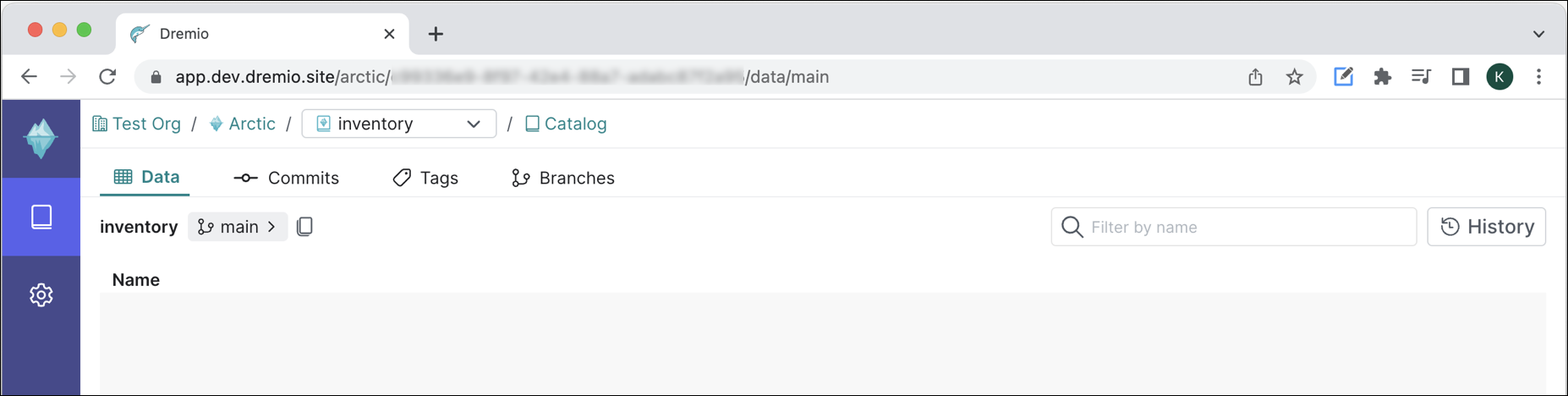
For more information about the catalog page, see Arctic Catalog.
Step 2. Connecting an Engine to Dremio Arctic
You can use Arctic with Dremio Sonar, Apache Spark, Apache Flink, and Apache Hive.
Compatibility
- Arctic uses Nessie as a transactional catalog for data lakes with Git-like semantics. See Nessie's Compatibility table for the versions of Spark, Flink, and Hive that are supported.
- Arctic supports Iceberg v0.13.1+
Prerequisites
In order to connect an engine to Arctic, you need a Dremio Cloud organization. If you don’t already have Dremio Cloud, see Signing up for Dremio Cloud.
Next, you need to have an Arctic catalog available. If you need to set up Arctic, see Adding an Arctic catalog.
If you are connecting Arctic to an external engine (Spark, Flink, or Hive) you need to:
Generate a personal access token (PAT), which provides the authentication needed to make the connection. If you have not created a PAT before, see [Personal Access Tokens](/cloud/security/authentication/personal-access-token/) for information about how Dremio Cloud uses these tokens and how to generate one.
- Retrieve the catalog endpoint. To retrieve the catalog endpoint:
From the Arctic catalog page, side navigation bar, click the Settings (gear) icon.
On the Catalog Settings page, under General Information, locate the Catalog Endpoint and copy the URL.
On the Project Settings page, General Information tab, locate the **Nessie Endpoint URL** and use the copy button to copy the URL.
Save the copied URL for later use. You need to provide this URL when you connect an external engine to Arctic.
If you are connecting Sonar to Arctic, you do not need to generate a PAT or retrieve the catalog endpoint.
Connect an Engine
Select the engine that you want to connect to Arctic:
Learning More
After completing the set up steps, you are ready to use Arctic.
- To learn more about how to use and navigate the Arctic catalog page, see Arctic Catalog.
- To learn the basics of using Arctic with Sonar, try the tutorial Getting Started with Dremio Arctic and Sonar.
- To learn the basics of using Arctic with Spark, try the tutorial Getting Started with Dremio Arctic and Spark.
- To learn about the available SQL commands for Arctic to manage your tables and views, as well as using commits, branches, and tags, see SQL Commands.
Limitations of Dremio Arctic Preview
- A table containing parallel changes on both source and destination branches cannot be merged. The workaround is to re-branch from the destination branch's head reference point, reapply your changes to that table, and retry the merge. For more information about working with branches in Nessie, see Branches on the Project Nessie website.
- If the main branch is dropped in an Arctic catalog, the sources for that catalog will no longer be accessible.